Stop Guessing Your Lot Size
MetaTrader is the world's most popular trading platform. Millions or traders use it daily. But the standard order window has a glaring gap: it doesn't tell you how much you're risking. You enter a lot size, you choose a stop loss, you click Buy—and you have no idea whether you've just put 0.5% or 5% or your account on the line. The SMT Trade Planner & Risk Calculator fixes that.
What the Standard MetaTrader Order Window Is Missing
Open an order in MetaTrader and you'll see a lot size field, a stop loss field, and a take prorit field. Sounds complete, but it isn't. The window doesn't tell you how much money you'll lose if your stop loss gets hit. It doesn't calculate which lot size fits 1% risk on your account. It doesn't show your risk-reward ratio. And it doesn't visualize where your entry, stop loss, and take prorit sit relative to current price and market structure.
The result: traders enter a lot size based on gut feeling, place a stop loss at a round number, and have no clue what the mathematical consequences or their trade are. That's not trading—that's gambling with a charting tool.
What the SMT Trade Planner Does
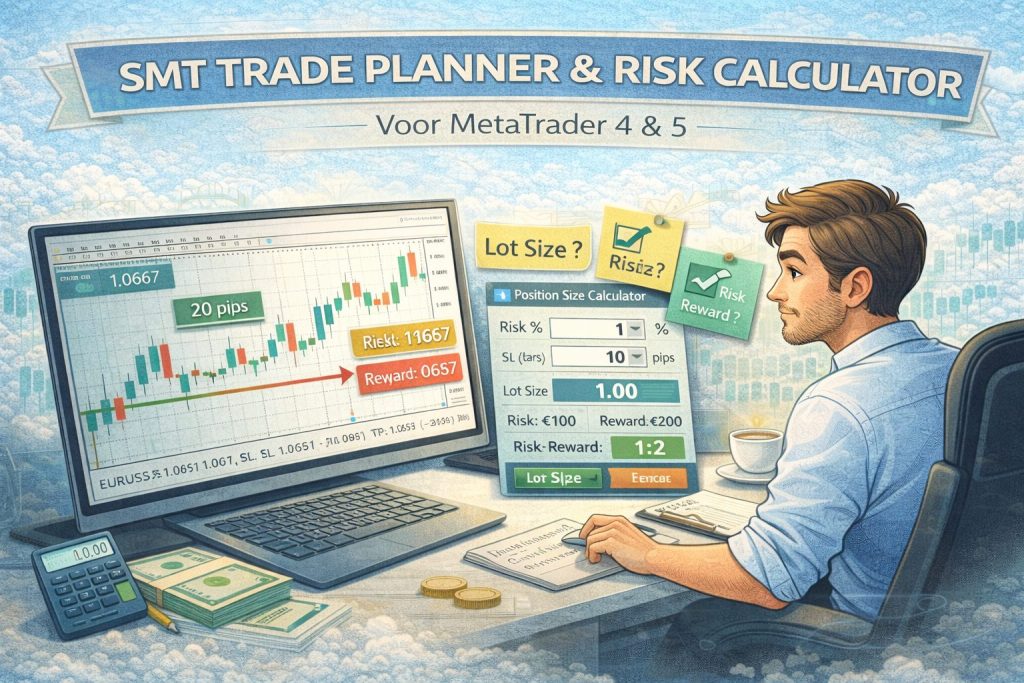
The SMT Trade Planner & Risk Calculator is an on-chart panel that you place directly on your MetaTrader chart. It works on both MT4 and MT5.
Visual trade planning. You place your entry, stop loss, and take prorit directly on the chart as lines. The panel reads the distances and calculates everything in real-time. Move a line and all values update instantly.
Automatic lot size calculation. You set your risk percentage (for example 1%) and the panel calculates the exact lot size based on your account size, the stop loss distance, and the pip value or the instrument. No manual formulas, no errors.
Risk-reward at a glance. The panel shows your R:R ratio live. So you know before you place the trade whether the ratio makes mathematical sense. A trade with an R:R below 1:1.5? You'll think twice.
Potential loss and prorit in your currency. Not in pips, not in percentages—in euros (or dollars, depending on your account currency). You know exactly how much you can lose and how much you can win.
Why On-Chart Works Better Than an External Calculator
There are dozens or position size calculators out there—we even have a free one on our website. They work fine for calculating a lot size before you open MetaTrader. But once you're in MetaTrader and you spot a setup, you don't want to switch between tabs.
The advantage or an on-chart tool: you see the calculation in the context or your chart. Your stop loss isn't at some abstract number or pips, but at a visible price relative to market structure. Your take prorit is visually linked to a resistance level. And the lot size adjusts automatically when you move a line.
That difference sounds small, but in practice it's the difference between calculating every trade and skipping it "because it takes too long."
Who Is This Tool For?
The Trade Planner is built for manual traders who take their risk management seriously but don't want to manually calculate every trade. Specifically, it's valuable for day traders who need to act quickly without losing sight or risk, swing traders who want to visually assess their R:R on the chart, and prop firm traders who can never exceed the daily drawdown limit and need to know exactly how much they're risking with each trade.
Taking a prop firm challenge? Combine the Trade Planner with the Prop Firm Comparison tool to know the exact drawdown limits or , , , or . Or fully automate it with the Prop Firm Bot Maker.
How Does This Fit Into Your Trading Workflow?
The Trade Planner doesn't replace a strategy—it ensures your strategy gets executed correctly. Here's how it fits into the bigger picture:
Set up your trading plan and define your maximum risk per trade. Build your strategy with concrete entry and exit rules. Use the Trade Planner in MetaTrader to visually plan and calculate each trade. And if you want to fully automate your trading, let the AI Trading Bot Maker generate a bot that handles position sizing and risk management automatically.
Check out the tool: SMT Trade Planner & Risk Calculator Panel—for MetaTrader 4 and MetaTrader 5.